
Table of Contents
EXTERIORVIBE.BIZ.ID – Many gamers dream of combining the portability of the Steam Deck with the visual fidelity of 4K resolution. This powerful handheld PC has reshaped portable gaming, but its ability to deliver a true 4K experience requires a closer look.
Understanding Steam Deck’s Native Resolution
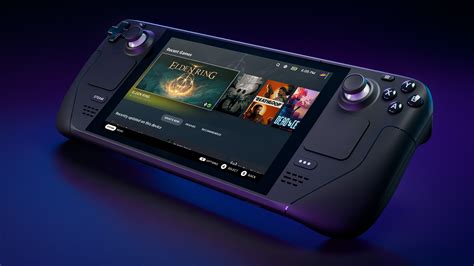
The Steam Deck’s built-in screen offers a sharp 7-inch display, typically at 1280×800 or 1280×720 pixels. This resolution is perfectly optimized for its compact size, ensuring games run smoothly without taxing the hardware excessively.
Connecting to External 4K Displays
While its internal display isn’t 4K, the Steam Deck can connect to external monitors or TVs, including 4K displays, via its USB-C port (or a dock). This allows users to output to a much larger, higher-resolution screen. However, simply connecting to a 4K display doesn’t automatically mean games will run well at that resolution.
The Performance Challenge of True 4K
Driving a 4K resolution (3840×2160 pixels) is incredibly demanding, even for powerful desktop gaming PCs. The Steam Deck, with its custom AMD APU, is primarily designed for optimal performance at its native lower resolutions. Attempting to run modern AAA games at native 4K will severely strain the hardware, often resulting in very low and unplayable frame rates.
Leveraging Upscaling Technologies: FSR
To bridge this performance gap, technologies like AMD’s FidelityFX Super Resolution (FSR) become crucial. FSR allows games to render at a lower internal resolution and then intelligently upscale the image to 4K, significantly boosting frame rates while retaining much of the visual detail. Many games support FSR directly, and the Steam Deck’s system-level FSR can apply it to almost any game.
Realistic Expectations for 4K Gaming on Steam Deck
Achieving a smooth 4K gaming experience on the Steam Deck is most feasible with older, less graphically intensive games or titles that fully support FSR. For demanding modern AAA games, users should expect to lower graphical settings drastically or target a lower external resolution like 1080p or 1440p for a more enjoyable experience. The Steam Deck excels as a portable device, and 4K output is a bonus feature with clear limitations.
While native, high-frame-rate 4K gaming on the Steam Deck is generally not feasible for demanding titles, its ability to connect to 4K displays combined with smart upscaling offers a viable path for certain games. Understanding these capabilities helps set proper expectations, ensuring a satisfying gaming experience on this versatile handheld.
Frequently Asked Questions (FAQ)
Can the Steam Deck play games in native 4K on its built-in screen?
No, the Steam Deck’s built-in screen has a native resolution of 1280×800 or 1280×720 pixels, not 4K. It is designed for optimal performance at these lower resolutions.
Is it possible to connect the Steam Deck to a 4K TV or monitor?
Yes, the Steam Deck can connect to external 4K displays via its USB-C port or a compatible dock. This allows you to output the display to a larger 4K screen.
What kind of performance can I expect when trying to play games in 4K on the Steam Deck?
Running modern, graphically intensive games at native 4K on the Steam Deck is extremely challenging and often results in very low, unplayable frame rates. Performance is better for older, less demanding games or when using upscaling technologies.
What is FSR and how does it help with 4K gaming on Steam Deck?
FSR (FidelityFX Super Resolution) is an upscaling technology from AMD. It allows games to render at a lower resolution (e.g., 1080p) and then intelligently reconstruct the image to a higher resolution (e.g., 4K), boosting frame rates while maintaining good visual quality. The Steam Deck supports system-level FSR.
Should I buy a Steam Deck specifically for 4K gaming?
No, if your primary goal is high-fidelity 4K gaming, the Steam Deck is not the ideal device. Its strengths lie in portable gaming at its native resolution or 1080p/1440p on external displays, especially with FSR. For dedicated 4K gaming, a more powerful desktop PC is recommended.
Written by: Sarah Davis
