
Table of Contents
EXTERIORVIBE.BIZ.ID – The Steam Deck has revolutionized portable PC gaming, offering a vast library of titles on the go. To truly enhance this experience, many users turn to external controllers, and the 8BitDo controller line stands out as a top choice for its quality and versatility.
Pairing a high-quality 8BitDo controller with your Steam Deck can significantly improve comfort and precision, especially for games designed with traditional gamepad input in mind. This guide will walk you through setting up and optimizing your 8BitDo controller for an unparalleled gaming journey.
Why 8BitDo Controllers Excel on Steam Deck
8BitDo has garnered a strong reputation for crafting retro-inspired controllers with modern functionality and robust build quality. Their extensive range ensures there’s an ideal gamepad for every type of player, from arcade stick enthusiasts to those preferring a classic PlayStation or Xbox layout.
These controllers often feature excellent battery life, precise inputs, and versatile connectivity options, making them perfectly suited for the Steam Deck’s portable nature. They offer a premium feel that complements Valve’s handheld, providing an immersive and responsive gaming experience.
Seamless Connectivity: Pairing Your 8BitDo Controller
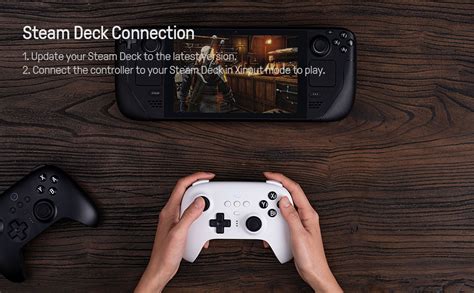
Connecting your 8BitDo controller to the Steam Deck is a straightforward process, typically relying on Bluetooth or a 2.4GHz wireless dongle. Most 8BitDo models support Bluetooth, which is the most common method for direct connection without extra accessories.
To pair via Bluetooth, put your 8BitDo controller into pairing mode (usually by holding a specific button combination like ‘Start + Y’ or a dedicated pairing button), then navigate to the Steam Deck’s Bluetooth settings and select the controller from the list. For controllers utilizing a 2.4GHz dongle, simply plug the dongle into a USB-C hub connected to your Steam Deck, and the controller should automatically connect once powered on.
Optimizing Your Gaming Experience with Steam Input
Once connected, the Steam Deck’s powerful Steam Input system allows for extensive customization of your 8BitDo controller. You can remap buttons, adjust joystick dead zones, and even create complex action layers for specific games, tailoring the controls exactly to your preference.
Additionally, regularly updating your 8BitDo controller’s firmware via the 8BitDo Ultimate Software on a PC is crucial for optimal performance and compatibility with new Steam Deck updates. This ensures you always have the latest features and bug fixes, maintaining peak controller functionality.
Troubleshooting Common Connection Issues
Occasionally, you might encounter minor hiccups when connecting your 8BitDo controller. If your controller isn’t pairing, ensure it’s fully charged and in the correct pairing mode, and try restarting both the controller and your Steam Deck.
For persistent issues, deleting the controller from the Steam Deck’s Bluetooth settings and re-pairing it often resolves connectivity problems. Checking online forums or 8BitDo’s support page can also provide specific troubleshooting steps for particular controller models.
Conclusion: Enhance Your Steam Deck Adventures
Integrating an 8BitDo controller into your Steam Deck setup significantly elevates the gaming experience, offering enhanced comfort, precision, and control. With easy connectivity and deep customization options, you can enjoy your favorite PC games with the perfect input device.
Embrace the freedom and flexibility that a well-paired 8BitDo controller brings, transforming your Steam Deck into an even more formidable portable gaming powerhouse. Dive into your game library with renewed enthusiasm, enjoying every moment with superior control.
Written by: Emma Johnson
