
Table of Contents
EXTERIORVIBE.BIZ.ID – The Steam Deck has revolutionized portable PC gaming, bringing a vast library of titles to a handheld device. Understanding Steam Deck compatibility is crucial for a smooth and enjoyable experience, ensuring your favorite games run flawlessly on the go.
Valve categorizes game compatibility into clear ratings, directly visible on each game’s Steam store page, helping players make informed decisions before downloading. These essential ratings indicate how well a game performs and integrates with the Steam Deck’s unique hardware and SteamOS interface.
Decoding Compatibility Ratings
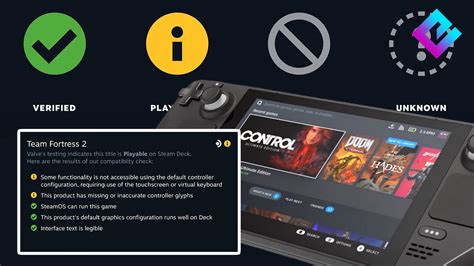
There are four distinct compatibility categories: “Verified,” “Playable,” “Unsupported,” and “Unknown.” “Verified” games offer a perfect, out-of-the-box experience, working flawlessly with no user adjustments needed to enjoy them fully.
“Playable” titles might require minor user interaction to function optimally, such as manually remapping controls or adjusting graphics settings for better performance. While these games may need a small tweak, they are generally highly enjoyable on the Deck.
“Unsupported” games typically have critical issues preventing them from running correctly, often due to incompatible anti-cheat software, specific hardware requirements like VR, or unsupported codecs. These titles are not recommended for the Steam Deck, although community workarounds sometimes exist.
Lastly, “Unknown” indicates that a game has not yet been officially tested by Valve, leaving its performance and functionality on the Steam Deck uncertain. For these titles, players can often consult community resources like ProtonDB, which gathers user-reported compatibility information.
Key Factors Influencing Performance
Several factors critically influence a game’s compatibility, including its control scheme integration, display resolution support, and overall performance optimization for handheld play. Games originally designed exclusively for keyboard and mouse input may require significant remapping to feel natural on the Deck’s built-in controls.
The underlying Proton compatibility layer, which enables Windows games to run on the Linux-based SteamOS, plays a pivotal role in compatibility. Regular updates to Proton and SteamOS continuously improve game support, potentially changing a game’s compatibility rating over time as issues are resolved.
While official Steam sales and festivals, such as those announced by Valve for 2026, often highlight new or updated titles, it’s always wise to check their current Steam Deck compatibility status. These events can be great opportunities to discover games that now offer an improved or newly “Verified” portable experience.
By diligently checking compatibility ratings and consulting community insights, players can confidently curate a robust library of games that truly shine on their Steam Deck. This proactive approach ensures a consistently enjoyable and seamless portable gaming adventure, free from unexpected technical hurdles.
Frequently Asked Questions (FAQ)
What do the “Verified” and “Playable” compatibility ratings mean for Steam Deck games?
“Verified” means the game runs perfectly out-of-the-box on Steam Deck without any adjustments. “Playable” indicates the game runs well but might require minor tweaks, such as manual control remapping or adjusting settings, for an optimal experience.
Can “Unsupported” games ever be made to run on the Steam Deck?
While officially “Unsupported” by Valve, some “Unsupported” games can occasionally be made to run with community-developed workarounds or specific Proton GE versions. However, this often requires technical knowledge and might not guarantee a stable or enjoyable experience.
Where is the best place to check a game’s Steam Deck compatibility status?
The most reliable place to check is directly on the game’s store page within the Steam client or website. Additionally, community sites like ProtonDB provide user-submitted compatibility reports and tips, especially for “Unknown” or “Playable” titles.
Does a game’s Steam Deck compatibility status ever change?
Yes, compatibility status can change over time due to game updates, SteamOS updates, or improvements to the Proton compatibility layer. A game might move from “Unsupported” to “Playable” or even “Verified” as issues are addressed or optimizations are made.
Written by: Robert Miller
