
Table of Contents
EXTERIORVIBE.BIZ.ID – The Steam Deck is more than just a portable PC; it’s a complete handheld gaming system with a highly versatile and integrated controller. Understanding its unique input methods is key to fully enjoying your vast Steam library on the go. This device truly redefines what a portable gaming experience can be, merging PC flexibility with console-like controls.
Valve designed the Steam Deck controller with a blend of traditional and innovative inputs to cater to diverse gaming genres. This thoughtful integration ensures that even complex PC games are playable and enjoyable in a handheld format. Every element works in concert to provide a fluid and responsive interaction, no matter the game.
The Innovative Core of Steam Deck Controls
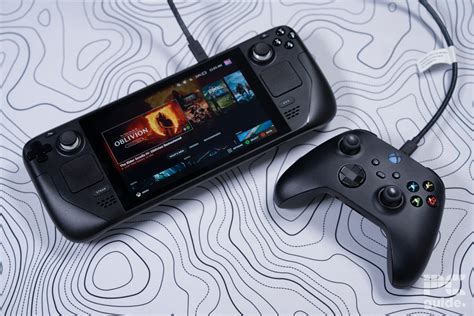
At its heart, the Steam Deck offers dual analog sticks, a D-pad, and standard ABXY face buttons, providing a familiar console-like feel. These traditional inputs are highly responsive, making action-packed games and platformers feel natural and precise. Players can transition seamlessly between various gaming styles with these core components.
Beyond the basics, the Steam Deck features two high-fidelity trackpads, a standout innovation borrowed from the Steam Controller. These trackpads offer mouse-like precision, essential for real-time strategy games or first-person shooters. They provide an invaluable input for games traditionally played with a mouse and keyboard.
Gyro controls further enhance aiming and camera movement, allowing for fine-tuned adjustments by tilting the device. This motion-sensing capability adds another layer of immersion and precision, particularly beneficial in shooter games or when navigating intricate menus. It truly offers a new dimension to handheld gameplay, bridging the gap between traditional and modern control schemes.
Additionally, the Steam Deck includes four customizable back buttons (grip buttons) on the rear of the device. These extra inputs can be mapped to various functions, providing quick access to often-used commands without moving your thumbs from the primary controls. They are a game-changer for complex control schemes, offering ergonomic advantages.
Unparalleled Customization with Steam Input
One of the Steam Deck’s greatest strengths lies in its deep controller customization, powered by Valve’s robust Steam Input system. This powerful tool allows users to remap every single button, trackpad, and gyro input to their preference. Players can create bespoke control schemes for every game, optimizing their experience to an unprecedented degree.
Beyond simple remapping, Steam Input enables complex actions, layering, and even activating various functions based on how long a button is pressed. The community also shares a vast library of custom controller layouts, allowing users to quickly find and apply optimized settings for popular titles. This collaborative aspect means you rarely have to start from scratch when configuring controls.
Expanding Your Play: External Controllers
While the integrated controls are phenomenal, the Steam Deck also fully supports external controllers for those who prefer them or when docked. You can easily connect Bluetooth gamepads, such as Xbox or PlayStation controllers, for a more traditional console experience. This flexibility extends the Steam Deck’s utility, making it adaptable to any gaming setup.
The device also supports USB-C controllers or adapters, allowing for a wide range of wired peripherals when connected to a hub or dock. Whether you prefer a fighting stick, racing wheel, or simply your favorite wired gamepad, the Steam Deck can accommodate. This versatility ensures that your gaming options are virtually limitless, whether handheld or on a big screen.
Conclusion
The Steam Deck’s controller is a masterclass in ergonomic design and input innovation. Its combination of traditional buttons, precision trackpads, responsive gyro, and customizable back buttons creates a highly adaptable gaming platform. With Steam Input, players gain unparalleled control over their gaming experience, truly making the Steam Deck a powerhouse for portable PC gaming.
Frequently Asked Questions (FAQ)
What makes the Steam Deck’s controller unique compared to other handhelds?
The Steam Deck’s controller stands out with its dual high-fidelity trackpads, precision gyro controls, and four customizable back buttons. These, combined with traditional inputs and deep Steam Input customization, allow for playing a much wider range of PC games effectively than most other handhelds.
Can I use external controllers with my Steam Deck?
Yes, the Steam Deck fully supports external controllers. You can connect various Bluetooth gamepads like Xbox or PlayStation controllers, and also wired USB-C controllers or adapters through a hub or dock, greatly expanding your play options.
How do I customize the controller settings on the Steam Deck?
Controller settings are customized through Valve’s powerful Steam Input system, accessible within the SteamOS interface. This allows you to remap buttons, adjust trackpad sensitivity, configure gyro settings, and even download community-made controller layouts for specific games.
Is the Steam Deck comfortable to hold for long gaming sessions?
The Steam Deck is generally designed for ergonomic comfort, even during extended play. Its integrated grip design and balanced weight distribution aim to reduce hand fatigue, though individual comfort may vary. The back buttons also contribute to a more comfortable hand position.
Written by: James Wilson
