
Table of Contents
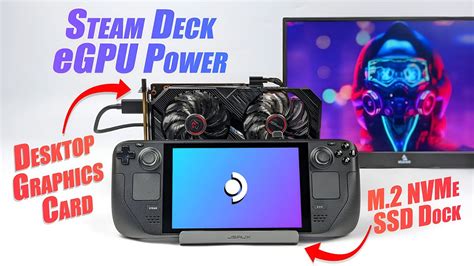
EXTERIORVIBE.BIZ.ID – The Steam Deck, Valve’s popular handheld gaming PC, offers impressive portability and performance for its size. However, some users seek to push its graphical capabilities further, especially when docked to a monitor, leading to interest in an eGPU (external Graphics Processing Unit) setup. An eGPU allows a portable device to tap into the power of a dedicated desktop graphics card, significantly boosting graphical output.
Understanding eGPU Functionality with Steam Deck
An eGPU essentially consists of a powerful desktop graphics card housed within an external enclosure, which connects to a computer via a high-bandwidth port. For the Steam Deck, this connection relies on its USB-C port, specifically using the USB 3.2 Gen 2 standard for data transfer. Unlike dedicated laptops with Thunderbolt ports, the Steam Deck’s USB-C connection presents certain bandwidth limitations for eGPU performance.
While the Steam Deck’s USB-C port can handle external displays and peripherals, its data throughput is less than Thunderbolt, which is optimized for eGPU use. This means that even with a powerful external graphics card, the full potential of the GPU might be bottlenecked by the connection speed. Users should manage expectations regarding performance gains, as they won’t typically match a dedicated desktop PC or Thunderbolt-enabled laptop.
Benefits of a Steam Deck eGPU Setup
Despite the connectivity nuances, integrating an eGPU with your Steam Deck offers compelling advantages, transforming it into a versatile gaming hub. The primary benefit is a substantial boost in graphical performance, enabling smoother framerates and higher resolutions for demanding games. This allows you to enjoy titles at 1440p or even 4K on an external monitor, a feat usually beyond the Deck’s integrated graphics.
Furthermore, an eGPU setup can extend the lifespan of your Steam Deck as a primary gaming device, allowing it to run future titles with improved fidelity. It effectively bridges the gap between a portable console and a desktop gaming PC, providing a more robust gaming experience when docked at home. You can also leverage more VRAM (Video Random Access Memory) from the external card for better texture quality.
Challenges and Considerations
Setting up an eGPU with a Steam Deck isn’t without its hurdles, mainly due to the software and hardware ecosystem. Compatibility can be tricky; while many eGPU enclosures and graphics cards might physically connect, ensuring they work seamlessly with SteamOS or Windows on Deck requires careful research. Driver support, especially on the Linux-based SteamOS, can be less straightforward than on a Windows environment.
Another significant factor is the cost involved, as both an eGPU enclosure and a separate graphics card represent a considerable investment. Additionally, power delivery needs to be managed; the eGPU enclosure typically requires its own power supply, separate from the Steam Deck itself. The performance bottleneck due to the USB 3.2 Gen 2 interface remains a key consideration, meaning you might not get a 1:1 performance uplift compared to a native PC connection.
Is a Steam Deck eGPU Right for You?
An eGPU setup for the Steam Deck caters to a specific niche: users who want to maximize their portable device’s capabilities for a docked desktop experience. If your goal is to play graphically intensive games at higher resolutions and framerates when connected to a monitor, and you’re comfortable with some technical tinkering, an eGPU can be a powerful upgrade. However, if portability and simplicity are your main priorities, or if budget is a strict concern, the Steam Deck’s native performance remains excellent for its intended use. Weigh the cost, complexity, and expected performance gains against your personal gaming needs.
Written by: Emma Johnson
