
Table of Contents
EXTERIORVIBE.BIZ.ID – Many new Steam Deck owners often inquire about “Steam Deck Joy-Cons,” drawing a natural comparison to the Nintendo Switch’s iconic detachable controllers. It’s important to clarify from the outset that the Steam Deck does not feature detachable Joy-Con style controllers of its own design. Instead, it boasts a robust set of integrated input mechanisms.
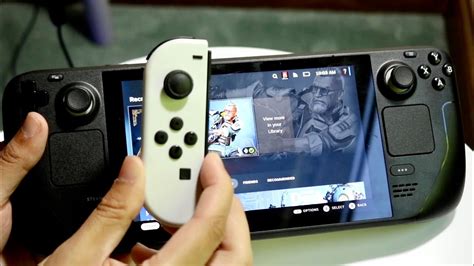
However, the good news for those who enjoy the versatility of Joy-Cons is that Valve’s portable PC gaming device offers excellent compatibility with external controllers. This means you can indeed connect and utilize Nintendo’s Joy-Cons with your Steam Deck, expanding your control options for various games.
Understanding the Steam Deck’s Native Controls
The Steam Deck is engineered with a comprehensive suite of fixed, integrated controls designed for a premium handheld PC gaming experience. These include dual analog sticks, a D-pad, ABXY face buttons, and four rear paddle buttons, alongside responsive trackpads. This layout provides extensive input flexibility, catering to a wide array of PC games directly out of the box.
Its ergonomic design ensures comfortable long-term gameplay, integrating all necessary controls seamlessly into the device’s body. These built-in features are a core part of the Steam Deck’s identity, providing a cohesive and powerful gaming interface without the need for additional accessories.
Connecting Nintendo Joy-Cons to Your Steam Deck
While the Steam Deck lacks its own detachable controllers, it fully supports Bluetooth connectivity, allowing you to pair various wireless gamepads, including Nintendo Joy-Cons. This feature significantly enhances the device’s versatility, especially for multiplayer sessions or when preferring a separate controller. Connecting Joy-Cons is a straightforward process, similar to pairing any other Bluetooth device.
To use Joy-Cons, you will need to enter the Steam Deck’s settings and initiate the Bluetooth pairing mode for both controllers. This method allows you to enjoy games with familiar Nintendo inputs or even enable local co-op on the go. The Steam Deck’s SteamOS handles controller inputs efficiently, often mapping them automatically.
Step-by-Step Bluetooth Pairing
To connect your Joy-Cons, first ensure they are charged and then navigate to the Steam Deck’s Steam Menu. From there, select “Settings” and then proceed to the “Bluetooth” tab. Activate Bluetooth if it’s not already on.
Next, hold down the small sync button on the side of each Joy-Con until its indicator lights begin to flash, signaling it’s in pairing mode. Your Steam Deck should then detect the Joy-Cons, allowing you to select and pair them one by one. Once paired, they will typically reconnect automatically in future sessions.
Advantages and Considerations
Using Joy-Cons with your Steam Deck offers several distinct advantages, particularly for local multiplayer games where additional controllers are a must. They also provide a lighter control option for some users, or simply a familiar feel for those accustomed to the Switch ecosystem. However, there are considerations to keep in mind.
Ergonomics might be less ideal for extended play compared to the Steam Deck’s native grips, and battery life will depend on the Joy-Cons themselves. Additionally, some advanced Steam Deck features, like the trackpads or back paddles, are not replicated by standard Joy-Cons. Software updates for SteamOS continuously improve controller compatibility, but minor configuration might occasionally be needed for specific games.
Exploring Alternative Controllers for Steam Deck
Beyond Nintendo Joy-Cons, the Steam Deck is compatible with a vast array of other Bluetooth controllers, offering even more choice for personalized gameplay. Popular options include Xbox and PlayStation controllers, which often provide excellent out-of-the-box compatibility and ergonomic comfort for many users. You can also explore third-party Bluetooth controllers designed specifically for PC gaming.
For those seeking a more integrated, detachable experience akin to Joy-Cons, various third-party accessory manufacturers offer attachable grip controllers that clip onto the Steam Deck. These accessories aim to provide a similar modular feel, enhancing the handheld experience with different button layouts or ergonomic designs, though they are not official Valve products.
In conclusion, while the Steam Deck doesn’t inherently come with “Joy-Cons,” its open nature and robust Bluetooth support make it highly adaptable. You can easily connect and use Nintendo Joy-Cons, alongside many other external controllers, to tailor your gaming setup. This flexibility ensures that every player can find a control scheme that suits their preferences and maximizes their portable PC gaming enjoyment.
Written by: Olivia Anderson
