
Table of Contents
EXTERIORVIBE.BIZ.ID – The realm of portable PC gaming has seen significant innovation, bringing robust gaming experiences to users on the go. Two formidable contenders leading this charge are Valve’s Steam Deck and Lenovo’s Legion Go, each offering unique approaches to handheld gaming. This article will thoroughly compare these devices, outlining their distinct features, advantages, and target audiences.
Design and Ergonomics: Comfort Meets Versatility
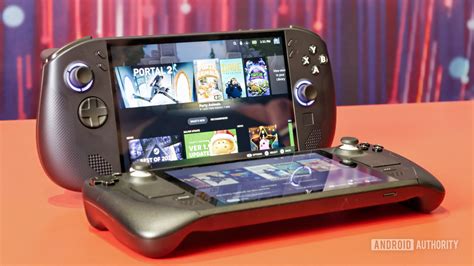
The Steam Deck is celebrated for its integrated, all-in-one design, where controls are seamlessly molded into the device for optimal comfort. Its slightly broader form factor ensures a secure and comfortable grip, even during extended play sessions. In contrast, the Lenovo Legion Go introduces detachable controllers, akin to the Nintendo Switch, providing greater versatility in play styles and potentially reducing hand fatigue when using the screen as a standalone unit.
Display Quality: Immersion and Clarity
Valve’s Steam Deck features a vibrant 7-inch LCD screen, delivering a rich visual experience well-suited for its 800p native resolution. The Lenovo Legion Go elevates this with a larger 8.8-inch QHD+ (2560×1600) display, offering superior sharpness and expansive screen real estate. This higher resolution on the Legion Go can provide a more immersive visual feast, although it might demand more from the hardware in graphically intensive titles.
Performance and Hardware: Power Under the Hood
Both handhelds leverage AMD APUs, custom-engineered for efficient portable gaming performance, though they utilize different generations. The Steam Deck is equipped with an RDNA 2 architecture, offering dependable performance tailored for its 800p display. The Lenovo Legion Go typically integrates the newer AMD Ryzen Z1 Extreme processor, generally providing a substantial uplift in raw processing and graphical capabilities, which is especially beneficial for its high-resolution screen.
Operating System and Ecosystem: Streamlined vs. Flexible
The Steam Deck operates on SteamOS, a Linux-based system meticulously optimized for a cohesive Steam library experience. This ensures excellent compatibility and performance for games verified within the Steam ecosystem, though it may require workarounds for non-Steam games. Conversely, the Legion Go runs full Windows 11, granting unparalleled compatibility with virtually any PC game launcher, application, or peripheral. This inherent flexibility positions the Legion Go as a more versatile portable PC.
Battery Life and Portability: Endurance and Size
Battery endurance for both devices fluctuates significantly based on game demands and settings. The Steam Deck, with its lower resolution display and optimized operating system, often achieves slightly longer battery life in various gaming scenarios. The more powerful Legion Go, especially when running games at its native high resolution, can experience faster battery drain. Regarding portability, the Legion Go is noticeably larger and heavier, a direct consequence of its bigger screen and robust hardware.
Price and Value Proposition: Accessibility vs. Premium
The Steam Deck typically offers a more approachable price point, making it an excellent entry into the world of portable PC gaming. Its deep integration with the Steam ecosystem provides a highly streamlined and user-friendly experience. The Lenovo Legion Go, with its premium display, innovative detachable controllers, and full Windows versatility, usually commands a higher price. It targets users seeking maximum power, flexibility, and a more premium experience.
Conclusion: Choosing Your Ideal Handheld
The ultimate choice between the Steam Deck and the Lenovo Legion Go hinges entirely on individual gaming preferences and priorities. The Steam Deck shines as a dedicated, user-friendly gaming console, offering exceptional Steam integration and significant value. Meanwhile, the Lenovo Legion Go appeals strongly to users who prioritize a larger, higher-resolution display, superior raw performance, and the comprehensive flexibility of a Windows operating system for both gaming and wider productivity needs.
Frequently Asked Questions (FAQ)
What is the primary difference between the Steam Deck and Lenovo Legion Go?
The main differences lie in their operating systems, screen size, and design philosophy. The Steam Deck runs Valve’s custom SteamOS with integrated controls, while the Legion Go operates on Windows 11 and features a larger display with detachable controllers.
Which device offers better gaming performance?
Generally, the Lenovo Legion Go, equipped with a newer AMD Ryzen Z1 Extreme processor, tends to offer superior raw gaming performance compared to the Steam Deck. However, the Steam Deck’s lower screen resolution often means it can achieve excellent frame rates without requiring as much raw power.
Is the Lenovo Legion Go heavier than the Steam Deck?
Yes, the Lenovo Legion Go is notably heavier and larger than the Steam Deck. This is primarily due to its expansive 8.8-inch screen and more robust internal hardware components, which contribute to its overall bulk.
Which operating system is better for a gaming handheld?
SteamOS on the Steam Deck is highly optimized for gaming, offering a streamlined, console-like user experience within the Steam ecosystem. Windows 11 on the Legion Go provides broader compatibility with virtually all PC games and applications, making it more versatile for tasks beyond just gaming.
Which device offers better value for money?
The Steam Deck typically offers a more budget-friendly entry into portable PC gaming, providing excellent value for its price and streamlined gaming experience. The Lenovo Legion Go, while more expensive, justifies its cost with a premium display, higher performance, and the full flexibility of the Windows operating system.
Written by: John Smith
