
Table of Contents
EXTERIORVIBE.BIZ.ID – The Steam Deck, Valve’s popular handheld gaming PC, offers an incredible portable gaming experience for players on the go. While its internal storage options are robust, many users quickly find themselves needing more space for their ever-growing game libraries, making a reliable Steam Deck SD card an essential upgrade.
Understanding the right type of external storage is crucial for optimal performance and enjoyment. This guide will walk you through everything you need to know about selecting the best SD card for your Steam Deck, ensuring seamless gameplay and ample room for all your favorite titles.
Why Your Steam Deck Needs an SD Card
Despite offering various internal SSD sizes, the digital nature of modern gaming means even large drives can fill up quickly. Many AAA titles now demand over 100GB of storage individually, rapidly consuming your device’s built-in capacity.
An SD card provides a cost-effective and convenient way to expand your Steam Deck’s storage without complex internal upgrades. It allows you to carry dozens more games, applications, and media, transforming your handheld into a true gaming powerhouse.
Understanding SD Card Types and Speeds
Not all SD cards are created equal, and choosing the right one significantly impacts your gaming experience. The Steam Deck specifically uses microSDXC cards, which offer high capacities and faster speeds compared to older formats.
Key specifications to look for include UHS Speed Class and Video Speed Class ratings. A U3 rating (or higher) is recommended for its guaranteed minimum sequential write speed of 30 MB/s, essential for installing and loading games efficiently.
Decoding UHS and V-Class Ratings
UHS (Ultra High Speed) ratings indicate the minimum write speed for compatible devices. U1 cards offer 10 MB/s, while U3 cards provide 30 MB/s, making U3 a much better choice for game performance.
Video Speed Class (V-Class) further refines speed ratings, with V30, V60, and V90 providing 30 MB/s, 60 MB/s, and 90 MB/s minimum write speeds, respectively. Opting for a V30 or higher ensures your games load quickly and run smoothly directly from the card.
Choosing the Right Capacity and Brand
When it comes to capacity, consider your gaming habits and budget; common choices range from 256GB to 1TB or even 2TB. Larger capacities mean you’ll rarely worry about deleting games to make space, offering a more convenient experience.
Reputable brands like SanDisk, Samsung, Lexar, and Kingston are known for their reliability and performance. Investing in a quality card from a recognized manufacturer helps prevent data corruption and ensures consistent speeds over time.
Installation and Performance Considerations
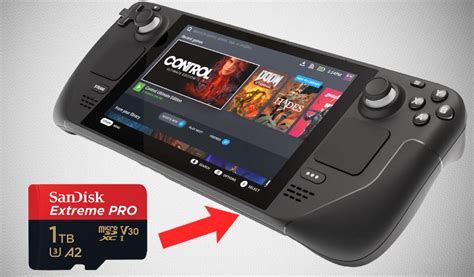
Installing an SD card into your Steam Deck is straightforward; simply insert it into the slot on the bottom edge of the device. The Steam Deck will automatically prompt you to format the card, preparing it for game storage.
While an SD card won’t match the raw speed of the internal NVMe SSD, a high-quality U3/V30 card offers excellent performance that is often indistinguishable in everyday gaming. Loading times for many games stored on a fast SD card are comparable to those on the internal drive, providing a seamless gameplay experience.
Conclusion: Maximize Your Gaming Potential
Equipping your Steam Deck with the right SD card is a game-changer, significantly enhancing your device’s utility and your overall gaming enjoyment. By understanding the specifications and making an informed choice, you can unlock a vast library of games without compromising on performance.
A fast, high-capacity Steam Deck SD card is a simple yet powerful upgrade that ensures your portable gaming adventures are limitless. Prioritize speed and reliability to make the most out of your Steam Deck.
Written by: Robert Miller
