
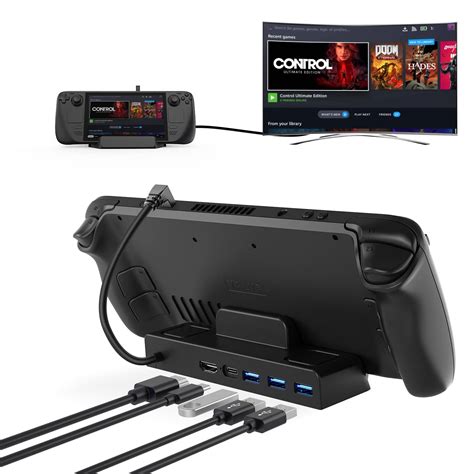
The Steam Deck, Valve’s handheld gaming PC, offers an incredible portable gaming experience right out of the box. However, its native port selection is limited, making a USB hub an essential accessory for many users.
Table of Contents
A Steam Deck USB hub transforms your portable console into a more versatile gaming and productivity station, greatly expanding its connection capabilities. This guide will explore why a USB hub is crucial and what features to prioritize for the best experience.
Why Your Steam Deck Needs a USB Hub
One primary reason to acquire a USB hub for your Steam Deck is to overcome its inherent port limitations. With just a single USB-C port for both charging and data, a hub allows for simultaneous connection of multiple peripherals. This means you can charge your device while also connecting a keyboard, mouse, or external storage.
Furthermore, a quality USB hub enables you to connect your Steam Deck to an external display, transforming it into a desktop-like PC. This capability is invaluable for enjoying games on a larger screen or for productivity tasks that benefit from more screen real estate. Expanding your visual options truly enhances the Steam Deck’s versatility.
Another critical advantage is the integration of Power Delivery (PD) through the hub. Many hubs support PD passthrough, meaning you can power your Steam Deck and all connected accessories from a single power adapter. This prevents battery drain while gaming intensely or using demanding peripherals.
Key Features to Look For
When selecting a Steam Deck USB hub, prioritize models that offer a variety of essential ports. Look for multiple USB-A and USB-C ports to accommodate different accessories like controllers, external drives, or card readers. Having diverse USB options ensures broad compatibility with your existing devices.
For external display connectivity, an HDMI or DisplayPort output is crucial for connecting to monitors or TVs. Ensure the hub supports the resolution and refresh rate you desire for your gaming setup. High-resolution support is vital for an immersive visual experience.
An Ethernet port is also highly recommended for a stable and fast wired internet connection, especially for online gaming or large game downloads. Relying solely on Wi-Fi can sometimes lead to latency issues or slower speeds. This physical connection offers superior reliability compared to wireless alternatives.
Finally, always check for Power Delivery (PD) capabilities, specifically how much wattage the hub can pass through to the Steam Deck. A hub with at least 45W-60W PD passthrough ensures your Steam Deck charges efficiently even under heavy load. Adequate power delivery is vital to maintain performance and avoid battery depletion.
Setting Up Your Steam Deck with a USB Hub
Connecting a USB hub to your Steam Deck is remarkably straightforward, typically involving a simple plug-and-play process. Just plug the hub into the Steam Deck’s USB-C port, and then connect your desired peripherals, display, and power adapter to the hub. The Steam Deck is designed to recognize these extensions automatically.
This ease of use means you can quickly switch between handheld and docked modes without complicated configurations. Whether you’re gaming on the go or settling in for a desktop-like session, your USB hub streamlines the experience. It truly unlocks the full potential of your versatile gaming device.
By carefully choosing the right Steam Deck USB hub, you can significantly enhance your gaming experience, expand connectivity, and transform your portable device into a powerful, multi-functional system. It’s an indispensable accessory for any serious Steam Deck owner looking to get more out of their handheld PC.
Frequently Asked Questions (FAQ)
Can I charge my Steam Deck using a USB hub?
EXTERIORVIBE.BIZ.ID – Yes, many Steam Deck USB hubs come with Power Delivery (PD) passthrough functionality. This allows you to connect your Steam Deck’s charger to the hub, and the hub will then deliver power to both the Steam Deck and any connected accessories.
What kind of ports should a good Steam Deck USB hub have?
A good Steam Deck USB hub should ideally feature multiple USB-A and USB-C ports, an HDMI or DisplayPort output for external monitors, an Ethernet port for a stable internet connection, and Power Delivery (PD) for charging.
Do I need a specific hub for my Steam Deck?
While most USB-C hubs will technically connect to the Steam Deck, choosing one specifically designed or optimized for gaming devices, or at least one with sufficient Power Delivery (e.g., 45W-60W passthrough), is recommended for optimal performance and compatibility.
Can I use multiple monitors with a Steam Deck via a USB hub?
Typically, most standard USB hubs designed for the Steam Deck support a single external monitor output (e.g., one HDMI or DisplayPort). For multi-monitor setups, you would usually need more advanced docking stations or specific graphics output configurations that are generally not supported by simple USB hubs.
Is an Ethernet port essential on a Steam Deck USB hub?
While not strictly essential for all users, an Ethernet port is highly recommended. It provides a more stable, faster, and lower-latency internet connection compared to Wi-Fi, which is particularly beneficial for online multiplayer gaming, large game downloads, and system updates.
Written by: Sophia Martinez
