
Table of Contents
EXTERIORVIBE.BIZ.ID – Welcome to the world of portable PC gaming with Valve’s Steam Deck, a revolutionary handheld device. A core feature enhancing this experience is the “Steam Deck Verified” program, ensuring games run flawlessly right out of the box.
This initiative helps players easily identify titles that offer an optimal and hassle-free gaming experience on their portable hardware.
Understanding Steam Deck Compatibility Categories
Valve has meticulously developed a compatibility rating system to help users understand game performance on the Steam Deck. This system is crucial for a smooth gaming experience, clearly indicating how well a title will perform on the handheld.
The “Verified” Gold Standard
Games marked as “Verified” are the gold standard, promising an excellent experience without any user adjustments. These titles fully support the Steam Deck’s controls, display, and Proton compatibility layer, offering complete functionality.
The “Verified” status means that text is legible, the default graphics configuration performs well, and all in-game features are accessible. Gamers can simply download and play these titles, trusting they will work seamlessly on their device.
Other Key Categories: Playable, Unsupported, and Unknown
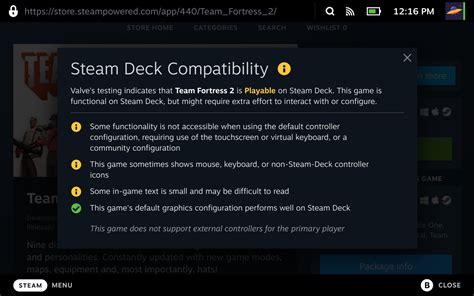
Beyond “Verified,” “Playable” games may require minor manual tweaks, such as adjusting settings or using the touchscreen for some UI elements. While still enjoyable, they don’t offer the immediate, perfect experience of a verified title.
“Unsupported” games, unfortunately, are unlikely to run well or at all, often due to DRM, anti-cheat software, or fundamental incompatibility with SteamOS. “Unknown” status applies to games not yet tested by Valve, leaving their compatibility a mystery.
Finding Steam Deck Verified Games
Identifying verified games is straightforward, both on the Steam Deck itself and through the Steam store. Look for the distinctive green “Verified” badge on game pages, which clearly indicates full compatibility.
The Steam Deck also features dedicated sections in its store interface, making it easy to browse specifically for verified titles. This integration ensures that finding optimized games for your handheld is always convenient.
Why Verified Games Enhance Your Experience
Opting for verified games significantly enhances your portable gaming journey by eliminating guesswork and frustration. You can dive directly into gameplay, confident that the title has been optimized for the Steam Deck’s unique hardware and software.
This focus on seamless play is a testament to Valve’s commitment to the Steam Deck, providing a curated library for its users. It allows players to enjoy a vast array of PC games with console-like simplicity and reliability.
The Broader Steam Ecosystem and Future Outlook
Valve’s dedication to the Steam Deck verification program is part of its larger commitment to the entire Steam platform. This ongoing effort ensures a robust and accessible gaming environment for all users.
The company frequently updates its game compatibility data, continually expanding the list of verified and playable titles. Furthermore, Valve’s consistent schedule of sales and game festivals, as seen with the recently announced 2026 timeline, ensures a steady flow of new content and opportunities to acquire these optimized games.
Frequently Asked Questions (FAQ)
What does “Steam Deck Verified” truly mean?
It signifies that a game has been thoroughly tested by Valve and functions perfectly on the Steam Deck without any required adjustments. This includes full controller support, legible text, and optimal performance on default settings.
How can I check if a game is Steam Deck Verified?
You can easily find the compatibility status on the Steam store page for any game, both on your PC and directly on the Steam Deck. Look for the distinct green “Verified” badge or browse dedicated “Great On Deck” sections.
Can I play games that are not “Verified” on my Steam Deck?
Yes, many games are classified as “Playable,” meaning they might require minor tweaks to settings or controls but are generally enjoyable. Only “Unsupported” games are likely to have significant issues.
Does Valve frequently update the compatibility status of games?
Absolutely, Valve continuously tests and updates the compatibility ratings for a vast library of games. A game’s status can change over time as updates are released or SteamOS improves.
Why are some popular games not “Verified”?
Common reasons include reliance on specific anti-cheat software not compatible with SteamOS’s Proton layer, complex user interfaces not optimized for small screens, or specific control schemes that don’t translate well to gamepad input.
Written by: David Thomas
