
Table of Contents
EXTERIORVIBE.BIZ.ID – The world of portable PC gaming has been revolutionized by two powerful contenders: the Valve Steam Deck and the ASUS ROG Ally. Both devices promise a full PC gaming experience on the go, yet they offer distinct approaches tailored to different gamer preferences.
Understanding their core differences is key to deciding which handheld system best suits your needs, from operating system philosophy to raw performance capabilities.
Operating System and User Experience
The Steam Deck runs on SteamOS, a Linux-based operating system specifically optimized for the Steam library and a console-like user interface. This provides a highly streamlined and intuitive experience for playing games purchased through Steam, making it incredibly user-friendly.
However, running non-Steam games or other PC applications on the Steam Deck requires a more technical setup, often involving compatibility layers or switching to a desktop mode.
In contrast, the ROG Ally operates on Windows 11, offering complete access to virtually any PC game launcher, including Xbox Game Pass, Epic Games Store, and GOG. This unparalleled flexibility allows users to tap into their entire PC game library without significant workarounds.
While Windows provides versatility, its traditional desktop environment can sometimes feel less optimized for a handheld interface, potentially requiring more navigation or minor adjustments compared to SteamOS’s dedicated gaming UI.
Performance and Hardware Power
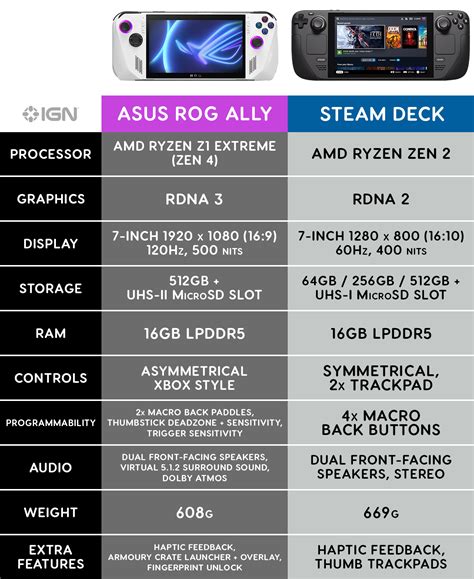
When it comes to raw processing power, the ROG Ally, particularly its Z1 Extreme model, generally holds an advantage over the Steam Deck. It features more modern AMD APUs (Accelerated Processing Units) that often translate to higher frame rates and better graphical fidelity in demanding titles.
The Steam Deck, powered by Valve’s custom Aerith APU, is still highly capable and delivers an excellent experience for a vast library of games, especially given its target resolution. However, the Ally’s newer architecture pushes the boundaries further for bleeding-edge performance.
Display and Ergonomics
The display is another significant differentiator between these two handhelds. The ROG Ally typically boasts a brighter 7-inch 1080p (Full HD) display with a faster 120Hz refresh rate, making games look incredibly sharp and smooth.
The Steam Deck features a 7-inch 720p or 800p display with a 60Hz refresh rate, which is still perfectly adequate for its resolution and helps conserve battery life. Ergonomically, the Steam Deck often receives praise for its larger, more pronounced grips, providing exceptional comfort during extended gaming sessions.
The ROG Ally is more compact and lighter, which enhances its portability, but some users might find its smaller grips less comfortable over long periods compared to the Deck’s design.
Battery Life and Ecosystem Value
Battery life is crucial for any portable device, and it can vary significantly based on game complexity and settings. Generally, the Steam Deck tends to offer slightly better endurance during less demanding games due to its lower-resolution screen and the power efficiency of SteamOS.
The ROG Ally’s more powerful hardware and higher-resolution display can lead to quicker battery drain during intensive gaming, though it supports faster charging. Regarding ecosystem, the Steam Deck’s integration with the Steam platform provides a seamless, console-like experience at a compelling price point, especially for those with extensive Steam libraries.
The ROG Ally, while usually priced higher, appeals to users seeking maximum performance and the full versatility of Windows, making it a true portable PC capable of more than just gaming.
Conclusion
The choice between the Steam Deck and the ROG Ally ultimately hinges on your personal priorities and budget. The Steam Deck is ideal for gamers seeking a highly polished, console-like experience primarily focused on the Steam ecosystem, offering great value and ergonomics.
Conversely, the ROG Ally is perfect for those who prioritize raw performance, access to a wider range of PC game launchers, and the full flexibility of a Windows operating system, albeit at a higher price point.
Frequently Asked Questions (FAQ)
Which device offers better gaming performance?
The ASUS ROG Ally, particularly models with the Z1 Extreme processor, generally offers superior raw gaming performance and higher frame rates compared to the Valve Steam Deck.
Which handheld PC has better battery life?
Battery life varies significantly based on the game and settings, but the Steam Deck often offers slightly better endurance during less demanding games due to its lower-resolution screen and optimized SteamOS.
Can I play Xbox Game Pass games on both devices?
Yes, but it’s much easier and more integrated on the ROG Ally due to its native Windows 11 operating system. Playing Game Pass on the Steam Deck requires workarounds like installing Windows or using cloud streaming services.
Which device is more affordable?
The Valve Steam Deck typically has a more affordable entry-level price point, making it a compelling value proposition for many gamers.
What is the main advantage of the Steam Deck’s operating system?
The Steam Deck’s SteamOS provides a highly optimized, console-like user experience specifically designed for the Steam game library, offering unparalleled ease of use for Steam games.
Written by: John Smith
