
Table of Contents
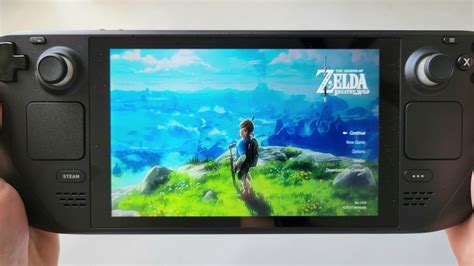
EXTERIORVIBE.BIZ.ID – The Steam Deck offers an incredible portable gaming experience, leading many users to wonder if they can play beloved Nintendo exclusives like Zelda Breath of the Wild on Steam Deck. While not officially supported, the answer is a resounding yes, making it a highly sought-after setup for enthusiasts.
This guide will demystify the process, explaining how to bring Link’s epic adventure to Valve’s handheld, transforming it into a versatile emulation powerhouse. Get ready to explore Hyrule from the comfort of your couch or on the go with exceptional performance.
Understanding Emulation: How Zelda Lands on Steam Deck
It’s crucial to understand that playing Zelda: Breath of the Wild on the Steam Deck requires emulation, as it’s a Nintendo-exclusive title. This means you won’t find it directly on the Steam store, but rather through software that mimics the original console’s hardware.
Emulation allows your Steam Deck to run games designed for other systems, effectively turning it into a Nintendo Switch or Wii U for this specific purpose. This method opens up a vast library of titles beyond native Steam games.
Choosing Your Emulator: Cemu or Yuzu?
For Breath of the Wild, players typically use one of two prominent emulators: Cemu for the Wii U version or Yuzu for the Nintendo Switch version. Both offer robust performance, but Yuzu is often preferred for its active development and features.
Many users opt for EmuDeck, a comprehensive script that automates the installation and configuration of multiple emulators, including Yuzu, making the setup process significantly simpler for newcomers.
Getting Started: Essential Setup Steps
To begin, you’ll need the game’s ROM files, which should be legally obtained from a copy you own. Installing your chosen emulator, often via EmuDeck, is the next critical step to prepare your Steam Deck.
Additionally, downloading and installing shader caches for Breath of the Wild is highly recommended to prevent stuttering during gameplay, as it compiles shaders beforehand for smoother performance.
Optimizing Performance for a Seamless Experience
The Steam Deck is powerful enough to run Breath of the Wild at a stable 30 frames per second (FPS), often achievable with minimal tweaks. Adjusting in-game and emulator settings, such as resolution scaling and shadow quality, can significantly impact performance.
Tools like CryoUtilities can further optimize your Steam Deck’s system resources, ensuring that your emulation experience is as smooth and visually appealing as possible. Battery life will vary, but proper settings can help extend your playtime.
The Portable Hyrule: Is It Worth the Setup?
Despite the initial setup, playing Zelda Breath of the Wild on Steam Deck is an incredibly rewarding experience. The game’s vast open world feels right at home on a portable device, offering unparalleled freedom to explore wherever you go.
The Steam Deck’s comfortable controls and vibrant screen enhance the adventure, making the effort involved in setting it up completely worthwhile for fans of the legendary title.
Frequently Asked Questions (FAQ)
Is playing Zelda: Breath of the Wild on Steam Deck legal?
Playing any game through emulation requires you to legally own a copy of the original game to be considered permissible. Obtaining ROMs from unauthorized sources can lead to legal issues and copyright infringement concerns.
Which emulator is best for Breath of the Wild on Steam Deck?
Yuzu (for the Nintendo Switch version) is generally considered the best emulator for Breath of the Wild on Steam Deck due to its active development, features, and optimization for modern hardware. Cemu (for the Wii U version) is also a viable option.
What FPS can I expect for Zelda: Breath of the Wild on Steam Deck?
With proper optimization and shader caches, you can generally expect to achieve a stable 30 frames per second (FPS) for Zelda: Breath of the Wild on the Steam Deck. Some areas might see minor dips, but the overall experience is very playable.
Do I need a powerful Steam Deck model to run Breath of the Wild?
All Steam Deck models share the same CPU and GPU, meaning any version can capably run Breath of the Wild via emulation. Performance differences between models are negligible for this specific use case.
Does playing Breath of the Wild on Steam Deck drain battery quickly?
Emulating a graphically intensive game like Breath of the Wild can be demanding on the Steam Deck’s battery. Battery life will vary depending on your chosen performance settings, but you can expect around 2-4 hours of gameplay on a full charge.
Written by: Robert Miller
