
Table of Contents
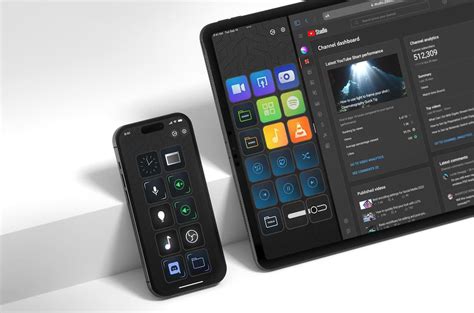
EXTERIORVIBE.BIZ.ID – The Stream Deck Mobile application revolutionizes how content creators, streamers, and productivity enthusiasts interact with their computers. It transforms your smartphone or tablet into a fully customizable virtual control panel, putting essential commands at your fingertips.
This innovative app allows users to manage a wide array of actions, from launching applications to controlling live streams, all with a simple tap. It provides an accessible and flexible solution for enhancing workflows and streamlining digital tasks across various platforms.
What is Stream Deck Mobile?
Stream Deck Mobile is essentially a software version of Elgato’s popular physical Stream Deck device, designed for iOS and Android smartphones and tablets. It leverages your existing mobile device to create a powerful, touch-based interface for your PC or Mac.
This means you don’t need dedicated hardware to experience the convenience of a Stream Deck, making it a highly accessible entry point for many users. The app integrates seamlessly with the Stream Deck desktop software, providing a unified control experience.
How Does Stream Deck Mobile Work?
Once installed on your mobile device, the app connects wirelessly to your computer running the Stream Deck desktop software. This software acts as the brain, allowing you to configure virtual buttons on your phone’s screen.
You can drag and drop various actions onto these buttons, customizing their icons and functions to suit your specific needs. From switching scenes in OBS Studio to muting your microphone on Discord, the possibilities for personalization are extensive and intuitive.
Key Benefits for Creators and Gamers
For live streamers and YouTubers, Stream Deck Mobile offers unparalleled efficiency in managing complex broadcasts. You can effortlessly switch camera angles, trigger sound effects, or post pre-written messages to chat with a single tap.
Gamers can also benefit immensely, especially with games acquired during events like the Steam Spring Sale, by binding complex in-game macros or frequently used system commands to their phone. This provides quick access without alt-tabbing, keeping you focused on the action.
Beyond content creation, the app is a formidable productivity tool, allowing you to launch multiple applications, open specific websites, or automate repetitive tasks. It significantly reduces reliance on keyboard shortcuts and mouse clicks, saving valuable time.
Stream Deck Mobile vs. Physical Stream Deck
The primary distinction between the mobile app and its physical counterpart lies in tactile feedback and portability. The physical Stream Deck offers satisfying, dedicated buttons, while the mobile version provides touch-based control using hardware you already own.
Stream Deck Mobile excels in portability and cost-effectiveness, requiring a subscription for full functionality after a trial period. In contrast, the physical device is a one-time purchase, offering a different user experience with its tangible buttons.
Getting Started and Pricing
To begin using Stream Deck Mobile, simply download the app from your device’s app store and install the free Stream Deck software on your computer. A subscription is typically required to unlock the app’s full feature set after a trial period, offering flexible payment options.
This subscription grants access to all features, including unlimited actions, profiles, and customization options, ensuring a powerful and adaptable control experience. It’s a cost-effective way to integrate professional-grade control into your digital life without investing in dedicated hardware.
Conclusion
Stream Deck Mobile stands as an exceptional tool for anyone looking to streamline their digital workflow, whether for professional streaming, casual gaming, or everyday productivity. It transforms your mobile device into a versatile command center, making complex tasks feel effortless.
Embrace the power of customizable control and discover how Stream Deck Mobile can enhance your efficiency and elevate your digital interactions. It truly brings a new level of convenience and capability to your fingertips.
Written by: Robert Miller
