
Table of Contents
EXTERIORVIBE.BIZ.ID – The Steam Deck, Valve’s popular handheld gaming PC, offers unparalleled portability for playing your favorite PC games on the go. However, to truly elevate your gaming experience and transform it into a versatile home console or even a desktop computer, a Steam Deck dock is an essential accessory.
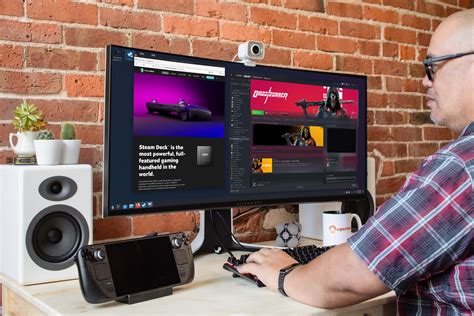
This compact device seamlessly connects your handheld to a larger screen, allowing for a more immersive gameplay session or expanded productivity. Understanding its functions and benefits can significantly enhance how you interact with your Steam Deck.
What Exactly Does a Steam Deck Dock Do?
At its core, a Steam Deck dock is a hub that expands the connectivity options of your device. It leverages the Steam Deck’s single USB-C port to provide multiple outputs and inputs, much like a traditional desktop PC.
Its primary function is to output video and audio to an external display, such as a TV or monitor, typically via an HDMI port. This allows you to enjoy your games on a bigger screen with greater visual fidelity.
Key Connectivity Options
Beyond video output, docks typically include several USB-A ports for connecting external peripherals like keyboards, mice, and controllers. This transforms your Steam Deck into a more traditional gaming setup or even a makeshift desktop environment for light work tasks.
Many docks also feature an Ethernet port, offering a stable wired internet connection for faster downloads and more reliable online multiplayer gaming. This can be crucial in areas with spotty Wi-Fi or for competitive play.
Crucially, a Steam Deck dock also provides power passthrough, ensuring your device remains charged while docked and in use. This eliminates worries about battery life during extended gaming sessions on your big screen.
Choosing the Right Steam Deck Dock
Valve offers its own official Steam Deck Dock, which is designed for perfect compatibility and integration. However, numerous third-party docks are available, often providing similar functionality at various price points.
When selecting a dock, consider the specific ports you need, such as the number of USB-A ports, the HDMI version for higher resolutions/refresh rates, and the presence of an Ethernet port. Always check reviews for compatibility and reliability with the Steam Deck.
Setting Up Your Dock for Optimal Performance
Connecting your Steam Deck to a dock is straightforward and typically involves plugging your Steam Deck into the dock’s USB-C input. Then, connect your dock to your display via an HDMI cable and plug in any desired peripherals.
Your Steam Deck should automatically detect the external display and adjust its output settings, offering a seamless transition from handheld to big-screen gaming. You can further fine-tune display and audio settings within the Steam Deck’s system menus.
Benefits of Docking Your Steam Deck
The most obvious benefit is the ability to play games on a larger screen, enhancing immersion and comfort. This is perfect for local co-op experiences or simply enjoying graphically intensive titles in a more traditional home console style.
Furthermore, by connecting a keyboard and mouse, you can use your Steam Deck for more than just gaming, effectively turning it into a compact Linux-powered desktop. This versatility makes the Steam Deck an even more valuable portable PC.
Ultimately, a Steam Deck dock unlocks the full potential of your device, bridging the gap between a portable handheld and a robust home gaming or computing station. It’s an investment that significantly broadens the usability and enjoyment of your Steam Deck.
Frequently Asked Questions (FAQ)
What is a Steam Deck dock?
A Steam Deck dock is an accessory that expands the connectivity of your Steam Deck, allowing you to connect it to an external display (like a TV or monitor), external peripherals (keyboard, mouse, controllers), and often provides a wired internet connection and power passthrough for charging.
Do I need a dock for my Steam Deck?
While not strictly necessary for playing games in handheld mode, a dock is highly recommended if you wish to play games on a larger screen, use traditional PC peripherals, or have a stable wired internet connection for your Steam Deck.
Can I use any USB-C dock with the Steam Deck?
Many third-party USB-C docks can work with the Steam Deck, but compatibility can vary. It’s best to check reviews and product specifications to ensure full functionality, especially regarding video output and charging capabilities. Valve’s official dock guarantees full compatibility.
What are the most important ports to look for on a Steam Deck dock?
Essential ports typically include HDMI for video output, several USB-A ports for accessories, and a USB-C input for power passthrough. An Ethernet port is also highly beneficial for a stable internet connection.
Does the Steam Deck dock charge the device?
Yes, almost all Steam Deck docks, including the official one, support power passthrough. This means you can plug your Steam Deck’s charger into the dock, and the dock will then charge your Steam Deck while it’s connected and in use.
Written by: Michael Brown
