
Table of Contents
EXTERIORVIBE.BIZ.ID – The Valve Steam Deck revolutionized portable PC gaming, offering a powerful yet compact experience. Many enthusiasts wonder what “Steam Deck equivalent PC specs” entail when considering building their own custom gaming machine or a similar compact system.
Understanding these specifications is crucial for anyone aiming to replicate or surpass the Deck’s performance in a traditional PC or a DIY handheld project. This guide breaks down the core components, offering insights into what hardware to target for a comparable gaming experience.
Deconstructing the Steam Deck’s Core Hardware
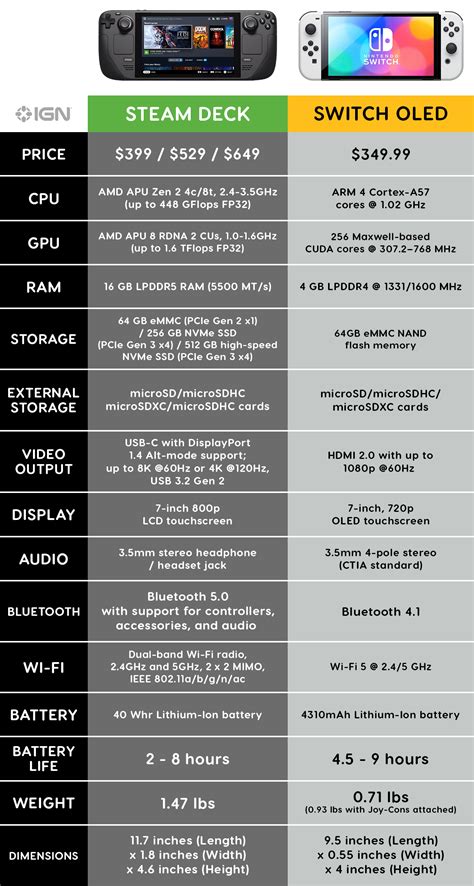
At its heart, the Steam Deck utilizes a custom AMD APU (Accelerated Processing Unit) code-named “Aerith,” combining CPU and GPU on a single chip. This custom chip is specifically optimized for efficient gaming performance in a low-power envelope, a key factor in its design.
For an equivalent PC, you’ll need to match this integrated performance with discreet components or a more powerful APU. The challenge lies in balancing power consumption with raw gaming capability, especially for smaller form factors.
CPU Considerations for an Equivalent PC
The Steam Deck’s CPU part of the APU consists of a Zen 2 architecture, 4 cores/8 threads, clocking from 2.4-3.5 GHz. To achieve similar processing power, look for modern CPUs like an Intel Core i3 (12th Gen or newer) or an AMD Ryzen 3 (5000 series or newer) with at least 4 cores and 8 threads. These processors provide ample power for running modern games and multitasking.
GPU Performance Matching
The integrated GPU in the Steam Deck uses RDNA 2 architecture with 8 compute units (CUs), clocking from 1.0-1.6 GHz, offering a respectable 1.6 TFlops of FP32 performance. Replicating this in a PC typically requires an entry-level dedicated graphics card, such as an NVIDIA GeForce GTX 1650 or an AMD Radeon RX 6400. Alternatively, an AMD Ryzen APU with RDNA 2 or RDNA 3 integrated graphics (like a Ryzen 5 5600G or newer) can offer comparable or better performance for lightweight systems.
RAM and Storage Standards
The Steam Deck features 16GB of LPDDR5 RAM running at 5500 MT/s, which is critical for smooth multitasking and game loading. For an equivalent PC, aim for 16GB of DDR4 RAM at 3200 MHz or faster, or DDR5 RAM for newer platforms, to ensure ample memory bandwidth. Storage-wise, the Deck uses NVMe SSDs, so a fast NVMe M.2 SSD is essential for quick boot times and game loading, ideally 500GB or more.
Beyond the Specs: Other Key Factors
While raw specifications are important, other elements contribute to the Steam Deck experience. These include the operating system, form factor, and overall thermal design, which are crucial for a DIY handheld or compact PC. Optimizing these aspects ensures a truly comparable experience.
Operating System and Software
The Steam Deck runs SteamOS, a Linux-based operating system optimized for gaming and seamless integration with the Steam platform. While a custom PC can run Windows for broader game compatibility, installing a Linux distribution with Steam Proton can offer a more “Deck-like” software experience. Consider the trade-offs between game support and system resource usage when choosing an OS.
Why Build an Equivalent PC?
Building a PC with Steam Deck equivalent specs offers several advantages, including greater customization, easier upgradeability, and often better thermal management in a larger chassis. This approach allows users to tailor components to their exact needs and preferences, creating a truly personalized gaming rig. It also provides flexibility to use a monitor, keyboard, and mouse, unlike the fixed handheld form factor.
Frequently Asked Questions (FAQ)
Is it cheaper to build a PC with Steam Deck equivalent specs?
Generally, no. The Steam Deck benefits from economies of scale and custom silicon optimization, making it very cost-effective for its performance. Building an equivalent PC, especially a compact one, often costs more due to individual component pricing and form factor challenges.
Can I get better performance than a Steam Deck for the same price?
In a traditional desktop form factor, you might achieve slightly better raw performance for a similar price by choosing a desktop CPU/GPU combo. However, matching the Steam Deck’s integrated display, battery life, and controller experience at the same price point in a *portable* custom build is extremely difficult.
What’s the main challenge in building a Steam Deck equivalent?
The primary challenge is achieving a similar level of portability and power efficiency. Sourcing compact components, designing effective cooling for a small chassis, and integrating a high-quality display and controls adds significant complexity and cost compared to a standard desktop build.
Do I need to use SteamOS for a Steam Deck equivalent PC?
No, you don’t *need* to use SteamOS. Most PC builders opt for Windows for broader game compatibility and driver support. However, SteamOS (or another Linux distribution with Proton) can offer a more authentic “Deck-like” software experience and potentially better performance for some games due to its optimizations.
Written by: William Clark
