
Table of Contents
EXTERIORVIBE.BIZ.ID – Transforming your Steam Deck into a Jellyfin server unlocks a powerful, portable media hub for all your digital content. This setup allows you to stream movies, TV shows, music, and photos directly from your Steam Deck to any compatible device on your network. It’s an innovative way to repurpose your gaming handheld for broader home entertainment needs.
Understanding Jellyfin and the Steam Deck
Jellyfin is a free and open-source media system that puts you in control of your entertainment. It serves as a personal media server, organizing your videos, music, and photos, and then streaming them to various devices. The Steam Deck, on the other hand, is a powerful handheld gaming PC developed by Valve, running on a Linux-based operating system called SteamOS.
While primarily designed for gaming, the Steam Deck’s underlying Linux environment and robust hardware make it highly versatile. Its capabilities extend far beyond gaming, allowing users to install and run a wide range of Linux applications. This flexibility is precisely what makes it an excellent candidate for hosting a Jellyfin server.
Why a Steam Deck Jellyfin Server?
Setting up a Jellyfin server on your Steam Deck offers several compelling advantages. Firstly, it provides unparalleled portability, allowing you to carry your entire media library with you and set up a streaming hub wherever you have power and a display. Secondly, the Steam Deck is energy-efficient, consuming less power than a dedicated desktop PC or NAS, making it an ideal low-power server solution.
Moreover, it’s an excellent way to consolidate your devices, using one powerful handheld for both gaming and media management. This setup is perfect for travel, dorm rooms, or simply enjoying your media collection on various screens around your home without needing a constant internet connection for streaming services. It truly personalizes your media consumption experience.
Setting Up Your Steam Deck as a Jellyfin Server
The process of turning your Steam Deck into a Jellyfin server primarily involves utilizing its Desktop Mode. In this mode, SteamOS behaves like a standard Linux desktop environment, granting you access to a wider array of applications and system settings. You’ll navigate to the desktop environment from the Steam Deck’s power menu.
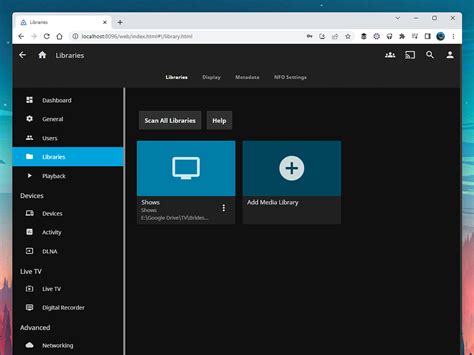
Installation of Jellyfin itself can be achieved through various methods, commonly using Flatpak via the Discover Software Center, or by adding the official Jellyfin repository and installing it through the command line. After installation, you’ll configure Jellyfin through its web interface, pointing it to your media libraries stored either on the Steam Deck’s internal storage or an external drive. This setup ensures your server can properly catalog and serve your content.
Optimizing Your Portable Media Experience
To maximize your Steam Deck Jellyfin server, consider using high-capacity microSD cards or an external SSD for storing your media files. This significantly expands your storage options beyond the internal drive, allowing for a vast library. Ensure your Steam Deck is connected to a stable Wi-Fi network or, if possible, an Ethernet adapter for the best streaming performance.
For enhanced functionality, you can configure your Jellyfin server for remote access, although this requires more advanced networking knowledge like port forwarding. Always keep your Steam Deck’s operating system and Jellyfin software updated to benefit from the latest features, security patches, and performance improvements. These steps will ensure a smooth and enjoyable media experience.
Conclusion
The Steam Deck’s versatility shines when repurposed as a Jellyfin media server, offering a unique blend of portability, power, and open-source freedom. It empowers users to create a personal entertainment ecosystem, completely under their control. This innovative application extends the utility of Valve’s handheld far beyond its initial gaming focus.
By following these guidelines, you can effectively transform your Steam Deck into a robust hub for all your digital media. Embrace the convenience and flexibility of having your entire entertainment library accessible from one compact device. The Steam Deck Jellyfin server represents a fantastic convergence of gaming hardware and personal media management.
Written by: Robert Miller
