
Table of Contents
EXTERIORVIBE.BIZ.ID – The Steam Deck, Valve’s powerful handheld gaming PC, offers incredible portability and access to your extensive Steam library. However, its internal storage can quickly fill up, leaving you yearning for more space to download new titles and updates.
Fortunately, expanding your Steam Deck’s storage is straightforward and cost-effective through the use of a Micro SD card, transforming your gaming experience by providing virtually unlimited room for your digital adventures.
Why Micro SD Cards Are Essential for Your Steam Deck
While the Steam Deck comes with various internal storage options, from 64GB to 512GB or even 1TB on newer models, modern game sizes mean this space can quickly become a bottleneck. A high-quality Steam Deck Micro SD card acts as a seamless extension, allowing you to store dozens, if not hundreds, of additional games.
This external storage solution is not only convenient but also remarkably easy to manage, ensuring you spend more time playing and less time juggling game installations.
Understanding Micro SD Card Specifications
Choosing the right Micro SD card for your Steam Deck isn’t just about capacity; speed and reliability are equally crucial for optimal performance. Key specifications to consider include storage size, speed class, and application performance class.
Ignoring these details can lead to slower game loading times and a less fluid gaming experience, diminishing the Steam Deck’s potential.
Capacity: How Much Space Do You Need?
Micro SD cards are available in a wide range of capacities, typically from 64GB all the way up to 1TB or even 2TB. For most users, a 256GB, 512GB, or 1TB card strikes a good balance between cost and storage needs, depending on the size of your game library.
Consider the average size of the games you play and how many you wish to have readily available before making your purchase decision.
Speed Ratings: U Class and A Class Explained
Micro SD card speed is indicated by two main ratings: UHS Speed Class (U1 or U3) and Application Performance Class (A1 or A2). U3 cards offer a minimum sequential write speed of 30 MB/s, which is generally recommended for gaming, while U1 offers 10 MB/s.
More importantly for the Steam Deck, look for an A2 rating, which signifies improved random read/write performance vital for quickly loading game assets and textures, making your games feel snappier.
Choosing the Best Micro SD Card for Your Steam Deck
When selecting a Steam Deck Micro SD card, prioritize cards with a U3 and A2 rating from reputable brands like SanDisk, Samsung, or Lexar. These specifications ensure excellent random read and write speeds, crucial for smooth gameplay and fast loading times.
While A1 cards will work, the performance boost from an A2 card is noticeable and highly recommended for a superior gaming experience on your Steam Deck.
Installing and Formatting Your Steam Deck Micro SD Card
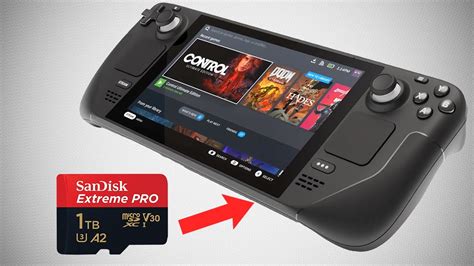
Installing a Micro SD card into your Steam Deck is incredibly simple. Locate the Micro SD card slot on the bottom edge of the device, insert the card until it clicks into place, and the Steam Deck will automatically detect it.
Upon insertion, the Steam Deck will prompt you to format the card for optimal use with its Linux-based operating system, a quick process that prepares the card for game installations.
Managing Games on External Storage
Once formatted, your Steam Deck will treat the Micro SD card as an extension of its internal storage. You can easily choose to install new games directly to the card or move existing games from internal storage to the Micro SD card through the SteamOS settings.
This flexibility allows you to optimize your storage usage, keeping your most frequently played games on the fastest storage, whether internal or external.
Best Practices for Micro SD Card Longevity
To ensure your Steam Deck Micro SD card lasts, always purchase from trusted retailers to avoid counterfeit cards, which often have inflated capacity claims and poor performance. Additionally, ensure the card is properly inserted and avoid physically bending or scratching it.
While the Steam Deck is designed for hot-swapping SD cards, it’s always a good idea to ensure no active game transfers or installs are occurring before removing it.
Conclusion
A Micro SD card is an indispensable accessory for any Steam Deck owner looking to maximize their portable gaming library. By understanding the key specifications and following best practices, you can effortlessly expand your storage and enhance your overall gaming performance.
Embrace the freedom of carrying countless games with you, all thanks to the simple yet powerful addition of a reliable Steam Deck Micro SD card.
Frequently Asked Questions (FAQ)
What type of Micro SD card is best for Steam Deck?
The best Micro SD cards for the Steam Deck are those with a U3 speed class and an A2 application performance rating. These cards offer optimal random read/write speeds, which are crucial for quick game loading and smooth performance on the Steam Deck.
How do I install a Micro SD card on Steam Deck?
To install, simply locate the Micro SD card slot on the bottom edge of your Steam Deck and push the card in until it clicks securely into place. The Steam Deck will then detect the new storage and prompt you to format it for use.
Do Micro SD cards affect Steam Deck performance?
Yes, the quality and speed of your Micro SD card can affect performance, particularly game loading times. A high-quality A2-rated card will provide near-internal storage speeds, while slower cards (e.g., A1 or lower speed classes) might result in longer loading screens.
What’s the maximum Micro SD card capacity for Steam Deck?
The Steam Deck officially supports Micro SD cards up to 2TB in capacity. However, cards up to 1TB are more commonly available and generally offer a great balance of storage and value for most users’ game libraries.
Can I use a Micro SD card for multiple Steam Decks?
While you can physically move a Micro SD card between different Steam Decks, games installed on it are tied to the Steam account that installed them. If moved to a different Deck with a different account, games might require re-installation or re-authentication to function correctly.
Written by: Michael Brown
