
Table of Contents
EXTERIORVIBE.BIZ.ID – The Steam Deck, Valve’s powerful handheld PC, offers incredible versatility for PC gaming on the go. Many users wonder about expanding its capabilities to include the vast library of Xbox games, creating a truly unified gaming experience.
Integrating Steam Deck Xbox gaming is entirely possible through several ingenious methods, primarily leveraging Microsoft’s streaming services rather than native installation. This guide will explore the most effective ways to enjoy your favorite Xbox titles directly on your Steam Deck.
Xbox Cloud Gaming (xCloud) on Steam Deck
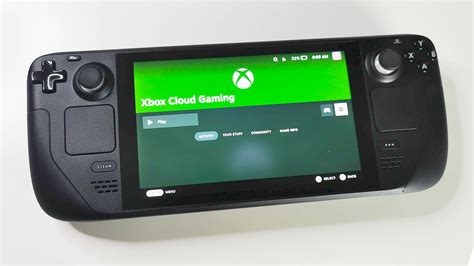
Xbox Cloud Gaming, part of Xbox Game Pass Ultimate, allows you to stream a vast library of Xbox titles directly from Microsoft’s servers over the internet. This method requires no installation of the games themselves on your Steam Deck, saving precious storage space.
To set this up, simply access the Xbox Cloud Gaming website through a web browser on your Steam Deck, such as Microsoft Edge, which can be added as a non-Steam game for easy access. You’ll need an active Xbox Game Pass Ultimate subscription and a stable, high-speed internet connection for the best experience.
Xbox Remote Play for Local Streaming
For those who own an Xbox console (Xbox One or Xbox Series X|S), Xbox Remote Play offers another excellent option. This feature allows you to stream games directly from your home console to your Steam Deck over your local network.
Setting up Remote Play involves installing the Greenlight client (an open-source Xbox streaming client) on your Steam Deck or using the official Xbox app on a Windows installation. This method often provides lower latency and better visual quality compared to cloud gaming, as long as your home network is robust.
Optimizing Your Steam Deck Xbox Experience
Regardless of your chosen method, several factors can enhance your Steam Deck Xbox experience. A strong Wi-Fi connection is paramount for smooth streaming, minimizing input lag and graphical artifacts.
Utilizing the Steam Deck’s robust control customization features allows you to perfectly map Xbox controller inputs to the handheld’s physical buttons and trackpads. Experiment with different settings within Steam Input to find what feels most comfortable for various game genres.
Beyond Xbox: The Broader Steam Ecosystem
While the Steam Deck opens doors to Xbox’s rich ecosystem, it remains fundamentally a powerful Steam device. Valve’s commitment to the platform is evident in its ongoing support and future plans, which consistently enhance the user experience.
As announced on January 16th, Valve’s complete schedule for 2026 official sales and game festivals for the PC gaming platform Steam, encompassing four major seasonal sales, numerous themed events, and the highly anticipated Steam New… (products and events), ensures a robust native PC gaming library is always available. This diverse offering complements any Xbox streaming efforts, providing a comprehensive gaming hub on your portable device.
Conclusion: Ultimate Handheld Flexibility
The ability to play Xbox games on your Steam Deck significantly expands the device’s utility, transforming it into an even more versatile portable gaming machine. Whether through cloud streaming or local remote play, the options are readily available for a seamless experience.
Embrace the flexibility of the Steam Deck to enjoy games from both the Steam and Xbox ecosystems, making it the ultimate handheld companion for any avid gamer. The future of portable gaming is truly open-ended with this remarkable device.
Written by: Robert Miller
